What the October 2026 research on AI tools and infostealer malware actually found
Three vendors published separately within a fortnight. Check Point Research described a Windows infostealer on 23 October 2026 whose configuration contains a collection module named, in the malware's own code, aisessions. Symantec's Threat Hunter Team described a family on 15 October 2026 that it detects as Infostealer.Aoki, saying the capability is recent and appears to be expanding. SpyCloud published on 30 October 2026 on two families, one of which it says was first observed on 3 August 2026.
Start with what these reports are, because it determines how much weight they carry. Check Point's work is analysis of a binary, its decrypted configuration and its network protocol. Symantec's is sample analysis. Neither reports live victim telemetry, infection counts or campaign statistics. SpyCloud is the only one of the three giving an infection number, and that number comes from its own collection of recovered logs with no stated sampling method. None of the three demonstrates a single case of a stolen AI credential being used against an account.
There is also a naming problem that nobody has resolved. Check Point calls its subject Aokigahara and notes an earlier version may have been known by two other names. Symantec calls its subject Aoki. SpyCloud treats Aoki as a family distinct from the other one it describes, and credits Symantec with the first analysis of it. No source we read says whether Aokigahara and Aoki are the same thing. Treat the family names as labels applied by different vendors to overlapping behaviour, not as a settled taxonomy.
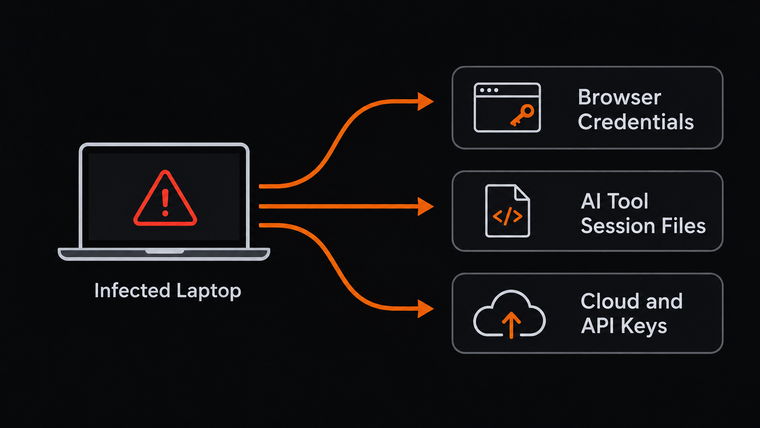
The AI module is really a developer credential module
This is the finding worth your attention, and it is visible in the file list rather than in any vendor's headline.
Check Point published the targets of the aisessions module. Some are what you would expect: Claude Code and Claude Desktop credential and configuration files, the Codex folder with its authentication file and configuration, the ChatGPT desktop cache, the local state databases used by Cursor, Windsurf, Kiro and VS Code, Copilot and Codeium configuration files, Gemini CLI token and master key files, JetBrains AI Assistant folders.
Then, inside that same AI module, sit three things that have nothing to do with AI subscriptions. The AWS credentials file. The AWS configuration file. The AWS single sign on cache. Alongside them, environment files, the .env files that developers use to hold secrets outside their code. Windows Credential Manager is queried too.
So the exposure is not a chatbot subscription. It is whatever those files hold, which in a small company is often cloud billing and production access. The reason the two sit together is mundane: AI coding tools are installed on developer machines, and developer machines are where cloud keys live. An attacker writing a collection module for one has every reason to collect the other in the same pass.
Two honest limits on that. Check Point states that not every targeted file necessarily contains authentication secrets, so a hit is not automatically a live key. And it states that all module implementations remain embedded in the executable even when disabled in the configuration, with a setting controlling which modules actually run. Check Point does not report that setting's value in the samples it analysed, so there is no published confirmation that the AI module was switched on in any observed infection. The capability is documented. The execution is not.
One detail is a different kind of loss. Symantec notes that the local database used by Cursor can cache chat context and code snippets. That is not a credential. That is your source code and whatever your developer typed into a prompt, which may include a customer name, an internal hostname or a configuration value.
What a password change does not do
Here is the part that most coverage gets slightly wrong, so we are going to be precise about what the provider documentation says and what it does not.
For keys and tokens, the position is unambiguous. We read the documentation of five providers. None of OpenAI, Anthropic, GitHub, Google Cloud or AWS documents a password change as the way to revoke an API key, a cloud access key or a personal access token. Each documents a separate, named action instead. Anthropic goes furthest and says it outright: logging out of all active sessions signs you out on every device, including browsers, mobile devices, desktop apps and Claude Code, and API keys are not affected. That is a provider stating in its own help text that the strongest account level action available to a user leaves a stolen key working.
GitHub is a partial counterexample and deserves naming as one. GitHub does document automatic revocation in several situations: when a token reaches its expiry date, when a valid token is pushed to a public repository or public gist, after a year without use, and for one class of token after eight hours by default. A GitHub token is therefore less durable than an unexpiring API key. None of those triggers, though, is a password change.
For sessions, the honest answer is that the documentation does not settle it. We could not find a page from any of these providers stating, in either direction, whether changing the account password ends existing web sessions. What every provider does publish is a separate sign out everywhere control, and their own wording treats the two as different actions. Anthropic's advice on an unfamiliar session is to terminate it and then consider changing the password. OpenAI notes that enabling multi-factor authentication does not cancel existing log-ins. So do both, and do not assume one covers the other. This is the same mechanism described in session cookie theft and in what survives a password reset, applied to a new set of files.
The one piece of measurement in this whole area comes from somewhere else. Okta Threat Intelligence analysed a 7 GB collection of stealer logs posted on a messaging channel on 2 August 2026, covering 5,871 machines across 162 countries, and found 44,791 unique tokens, of which 1,843 were still unexpired on the day the dump was released, along with 24 AI service API keys that were still valid. Note the shape of that: roughly 4 per cent of the tokens were alive at publication, and the valid keys were a very small number. Keys outlive sessions, because nothing expires them. Note also what that analysis does not show, in the words of the research note reporting it: it does not show how many of those tokens were actually used.
What to do this week
Find out where your keys are before you need to know. The useful contribution of all this research is the file list, and you can read it as an inventory. Who at your company has an AWS credentials file on a laptop. Who has an AI service API key. Which .env files exist outside a secrets manager. For most small companies this is a conversation with one or two people, not a project.
Rotate keys on a schedule and rehearse it once. Anthropic suggests rotating API keys on a consistent schedule, for example every 90 days, by creating new ones and deactivating old ones. AWS documents the pattern that matters under pressure: update the key, deactivate the original, confirm the application still works, then delete the original. That order exists so a live service does not break. Practise it when nothing is wrong, because improvising it during an incident is where small companies cause their own outage.
If a device turns up in exposure data, treat every key on it as compromised. Not just the password. Revoke and reissue keys first, because the password change does nothing to them and delay only widens the window. Then end sessions everywhere, then change the password. At OpenAI, other sessions can take up to half an hour to close, so do not assume the job is finished the moment you click. This is the same reasoning as in what is infostealer malware and in reading a credential exposure report: the record tells you a device was compromised, and the device had more on it than one password.
Do not buy a product on the strength of this news. There is no published figure for how common this is, the research describes capability rather than measured infections, and the remediation steps are all free and self service at every provider we checked. What is worth money is knowing which of your devices are infected, which is a different question and the one stealer log monitoring exists to answer.